
This document provides clear instructions on how to configure Perspective so that candidate applications are successfully sent to Kini and then forwarded to your Applicant Tracking System (ATS) in real time.
🔑 Required Setup in Perspective
To ensure smooth integration, please follow these steps in your Perspective funnel configuration:
1️⃣ Choose your External Job ID method
You must choose exactly one of the following methods to pass the external job ID from your ATS. Do not use both methods.
Option A: Result page title (recommended) ✨
Include the external job ID in your final result/thank-you page title by wrapping it in square brackets.
✅ Example:
Thank you – Sales Manager [EU-42]
In that case EU-42 will be used as the external Job ID. Please make sure to not include any spaces inside the brackets.
Option B: URL parameter utm_term ✨
If this option is chosen, each application must include the external job ID from your ATS as an utm_term parameter in the funnel URL.
✅ Example:
https://your-perspective-page.com/apply?utm_term=123456Here, 123456 is the external job ID that Kini uses to map the application to the correct job. Simply add the parameter when sharing your funnel.
❓Not sure where to find your external_id?
If you're not sure where to find your Job's external_id, feel free to reach out to us:
📧 [email protected]
2️⃣ Use Perspective Built-in Fields
Perspective’s built-in candidate fields (e.g., first name, last name, email) must be used for core candidate data. Supported fields include:
firstNamelastNameemailphonewebsiteaddresscitypostalCodecountry
These fields are automatically mapped to the candidate profile in Kini and forwarded to the ATS.
3️⃣ Fallback Job ID (Optional)
If no utm_term is provided (e.g., via a shared application link), candidates will be assigned to a fallback job in Kini.
- Share your fallback job ID with Kini so we can configure it.
4️⃣ Screening Questions
Screening questions must be configured so that their IDs and answer options match your ATS.
- Retrieve the question IDs and options from your ATS (via the Kini API or Job feed).
- In Perspective, add each question using the ID prefixed with
sq_.
✅ Example:
If the ATS question ID is earliestStartDay, use sq_earliestStartDay in Perspective.
Ensure the answer choices match 1:1 with those in the ATS.
5️⃣ File Attachments
Use Perspective's standard file upload field but change the tracking ID to start with file_:
Primary file types (recommended):
file_cv- CV/Resume filesfile_resume- Resume filesfile_cover_letter- Cover letter files
Other file types:
- Any ID with the prefix
file_also works, i.efile_certificate,file_otheretc.
6️⃣ Ignored Fields
Any Perspective field prefixed with ignore_ will be excluded from the synchronization and not forwarded to the ATS.
7️⃣ All Other Fields → Comments
Fields that do not match the above criteria will be automatically appended as comments to the candidate profile in the ATS.
8️⃣ Add Webhook URL
Within your funnel, go to Apps > Webhooks and add the provided webhook URL.
https://api.getkini.com/webhooks/perspective/{company_id}
- Replace
{company_id}with the ID of your company in Kini (see Partner App). - Add the webhook URL under Funnel Completed, not New Lead .
- Important: This URL must be added to every funnel for which the integration should be enabled.
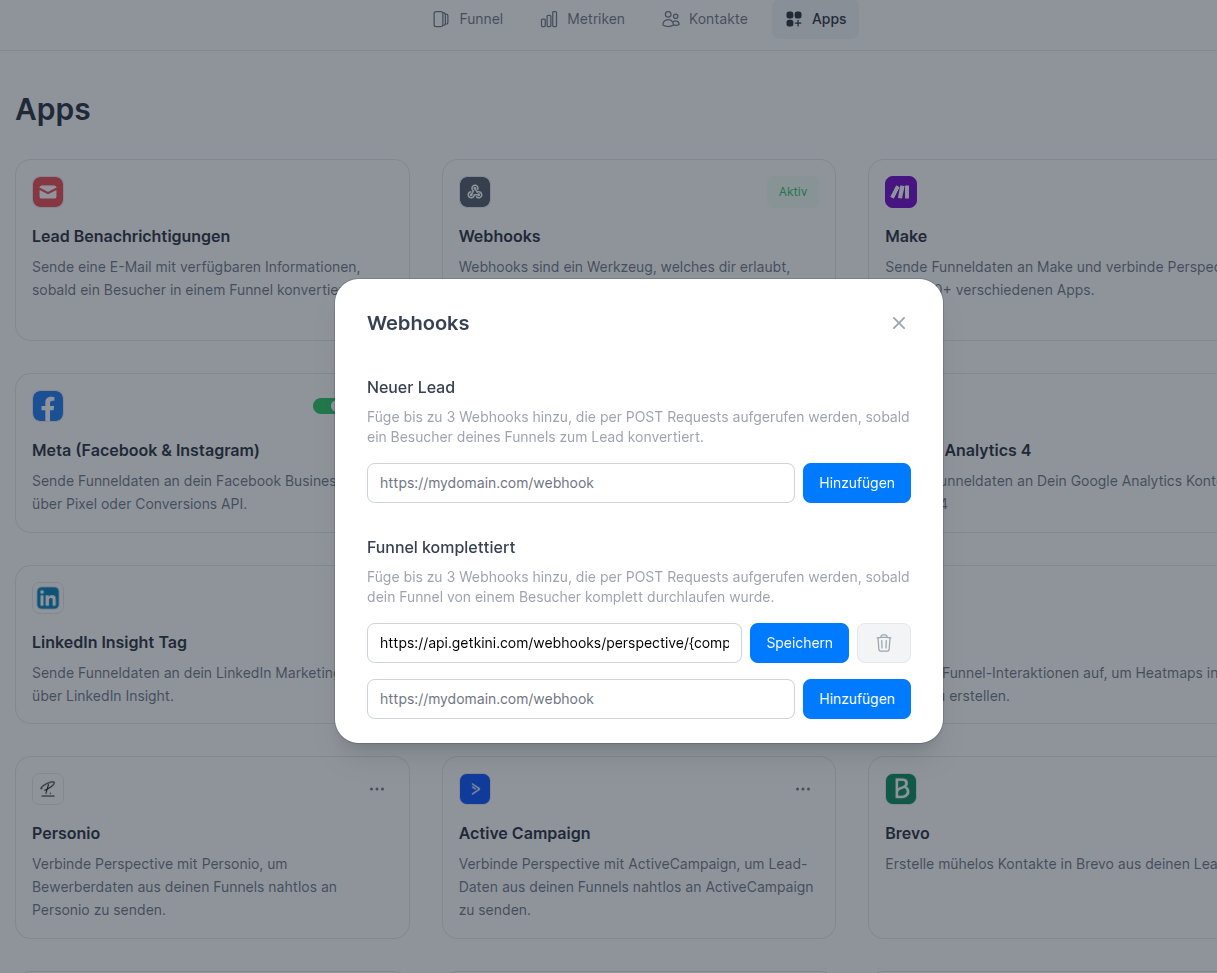
Make sure to insert the webhook in "Funnel Completed", NOT "New Lead"
✅ Summary of Perspective Setup
- Either embed the external_id in brackets in your result page title or add
utm_termas a URL parameter to pass the external job ID. - Use built-in Perspective fields for candidate basics (name, email, phone, etc.).
- Provide Kini with a fallback job ID (optional but recommended).
- Use the
file_prefix in any file upload fields. - Configure screening questions using
sq_<ID>and exact answer options. - Prefix any non-ATS fields with
ignore_to exclude them. - Remaining fields will automatically be stored as comments.
- Add the Webhook URL under Apps > Webhooks for all relevant funnels.
💬 Need Help?
If you need assistance with the setup or want Kini to review your Perspective funnel, please reach out to us:
📧 [email protected]